

If you own a service-based business in Montgomery County—whether you’re building backyard pools or dream homes—you know how competitive the local market can be. But here’s the good news: with the right tools, you can stand out from the crowd. One of the most powerful tools at your disposal? Your Google Business Profile (GBP). In this step-by-step guide, we’re going to walk you through the process of maximizing your Google Business Profile so you can get more leads, more customers, and ultimately, more business.
Why Google Business Profile Matters for Service-Based Businesses
Before we dive into the “how,” let’s talk about why your Google Business Profile matters. For a local business, especially one that deals with larger, service-based jobs, your Google Business Profile is your digital storefront. It’s the first thing many potential customers see when they search for your services on Google.
Google’s search engine pulls information from your profile to help users find relevant, nearby businesses that fit their needs. For example, when someone searches for “pool builders near me” or “home builders in Montgomery County,” your business could be one of the first results they see. And we all know, the higher you rank, the better your chances of landing that dream project.
How Local Businesses Can Get the Most Out of Their Google Business Profile
Step 1: Claim Your Google Business Profile (If You Haven’t Already)
First things first: if you don’t have a Google Business Profile set up yet, you need to claim one. It’s free, and trust us—it’s worth every minute. If you’re not sure how to add or claim your Google Business Profile on Google, follow this guide. Google will review your information and prompt you to verify your business.
Once you’re verified, you’ll be able to access and manage your Google Business Profile.
Step 2: Optimize Your Profile with Accurate, Up-to-Date Information
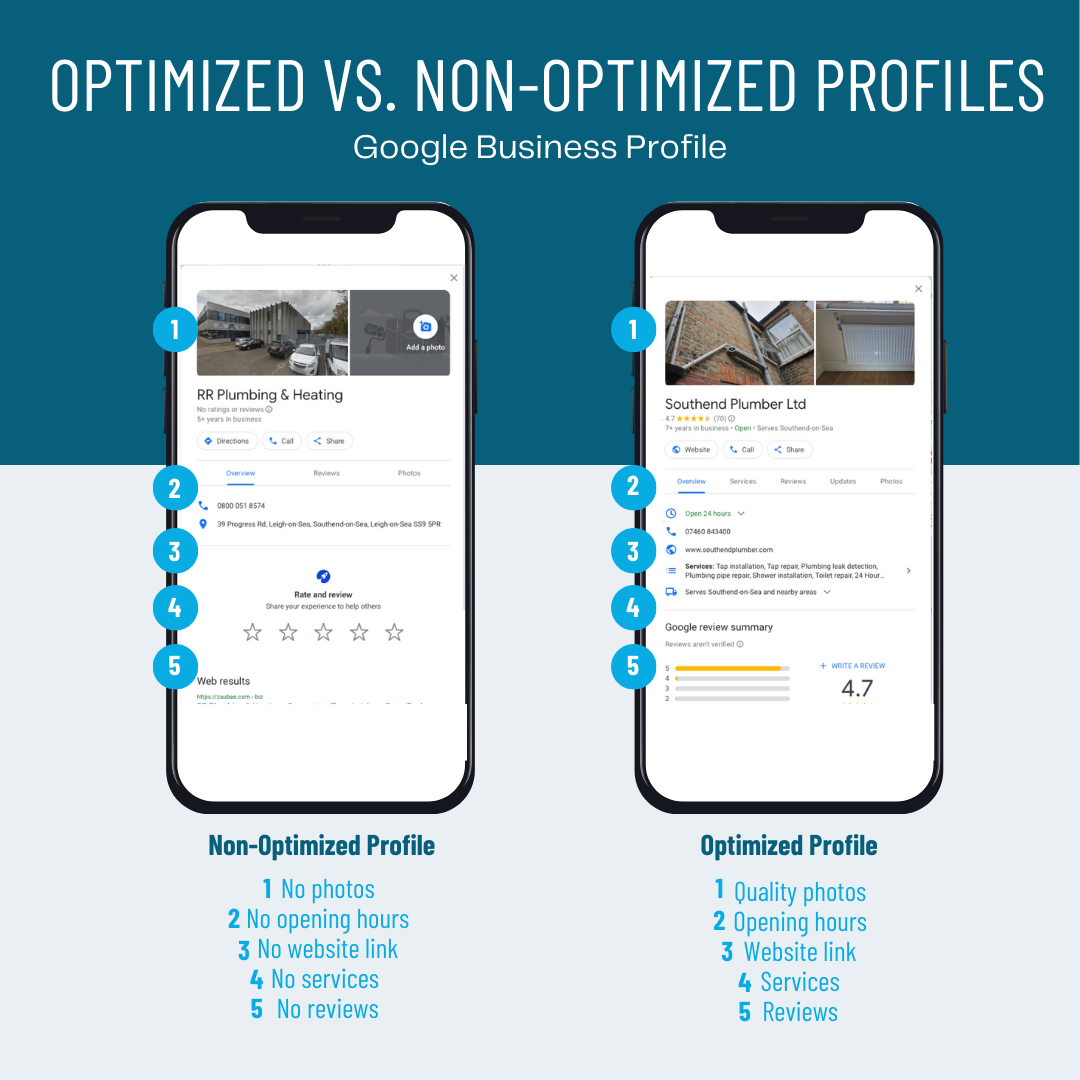
Photo Credit: Ignite Visibility
The next step is to fill in all the important details about your business. You want your Google Business Profile to paint an accurate picture of who you are and what you offer. The more detailed and precise your profile is, the better your chances of ranking higher in search results.
Here are some key areas to focus on:
- Business Name: Make sure your business name is consistent across all your online listings, and that it’s easy to find. No need for unnecessary keywords here—just your business name as it appears in real life.
- Business Address: For service-based businesses, you can choose whether you want to display your address or hide it (useful if you work from a home office or a job site). If you serve specific areas, like Montgomery County, be sure to list your service areas. You can read more about Service Area vs Business Location here.
- Phone Number & Website: Ensure your contact details are correct and easily accessible. A potential customer might need to call you for a quote or visit your website for more information—make it easy for them to do both.
- Business Hours: Keep your hours updated, especially if your service hours change seasonally. Clients who are looking to schedule a consultation or project might call outside regular business hours, so you want to show them when they can reach you.
Step 3: Add Photos That Showcase Your Work
You don’t need us to tell you that in today’s ultra-digital world, visuals speak volumes. Show off your work with high-quality photos that highlight your best projects—whether it’s a sleek pool installation or a gorgeous new kitchen you just remodeled. Potential clients love to see what you’re capable of!
Here’s what to focus on:
- Before-and-after photos: These are gold! Show your potential clients the transformation your service can bring.
- Project shots: Showcase the variety of work you do—big or small, your photos should tell the story of your expertise.
- Team photos: Personalize your business! Show your team in action so customers can see who they’ll be working with. A smiling crew can go a long way toward building trust.
Not sure where to start with adding photos to your local business on Google? Check out this guide!
Step 4: Collect & Respond to Reviews
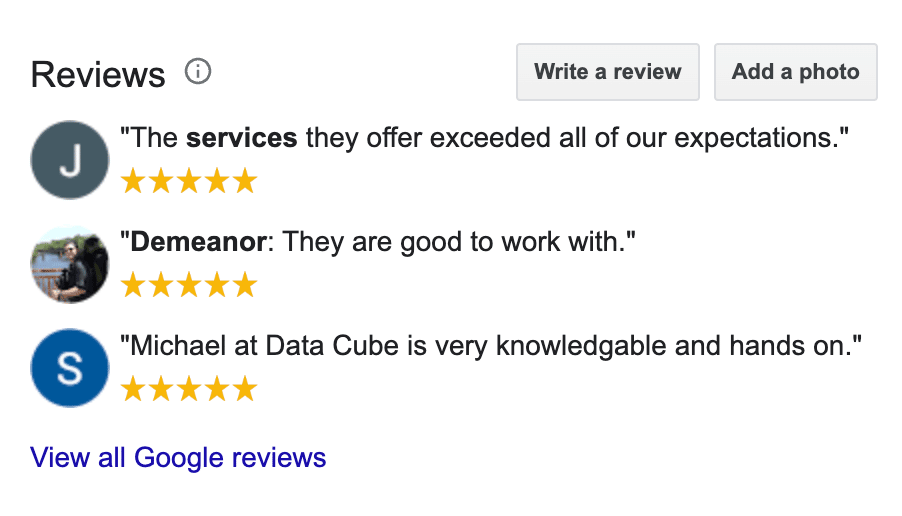
Photo Credit: Pronto Marketing
Let’s be honest: people trust online reviews. They want to hear about the experiences others have had with your business before they take the leap and hire you. In fact, according to Trustmary, eCommerce websites experienced a 67% increase in online conversions when visitors saw customer reviews on the site.This is especially true for larger service-based jobs, where the investment is significant.
Encourage your satisfied customers to leave glowing reviews on your Google Business Profile. Here’s how:
- Ask for reviews: Don’t be shy about asking happy customers for feedback. A simple follow-up email or text message can work wonders.
- Respond to reviews: Whether the review is positive or not-so-positive, always take the time to respond. A friendly, professional reply shows that you value your customers and care about their experience. It also improves your visibility in search results.
If you’re struggling to make your Google reviews work for you, read our blog about how to use Google reviews to boost your business!
Step 5: Use Google Posts to Keep Customers Updated
Google Posts are a fantastic way to share updates, special offers, or relevant content right on your profile. Whether you’re announcing a seasonal discount or showcasing a recent project, Google Posts let you keep potential customers in the loop.
Pro tips for posts:
- Share behind-the-scenes content or time-lapse videos of big projects.
- Announce limited-time offers or discounts to attract more leads.
- Post seasonal tips related to your services (e.g., “Get Your Pool Ready for Summer—Schedule Your Maintenance Now!”).
Tip: Don’t forget to add an eye-catching call to action (CTA) like “Call Now,” “Get a Quote,” or “Book an Appointment.” You want customers to take action.
Step 6: Monitor Insights to Track Your Success
Your Google Business Profile isn’t just a static page—it’s a dynamic tool that provides valuable insights. Keep an eye on the data to understand how your profile is performing and where there’s room for improvement. You can track:
- How many people are viewing your profile
- Where they’re finding you (search vs. map)
- How they’re interacting with your profile (calls, website clicks, requests for directions)
Explore more about Google Business Profile insights for your local business here.
Use these insights to fine-tune your strategy. If you’re getting a lot of website clicks but not many calls, it might be time to revisit your website’s user experience or add more compelling CTAs to your profile.
Level Up Your Google Business Profile With Trulove Webworks
Maximizing your Google Business Profile is one of the smartest ways to grow your service-based business in Montgomery County. So, take a few minutes to revisit your profile, make those updates, and start reaping the rewards.
If the thought of managing all of this sounds overwhelming, don’t worry—Trulove Webworks specializes in helping businesses like yours get seen on Google and we’re here to help! We take care of the details for you, from responding to reviews to crafting eye-catching Google posts. Let us handle the heavy lifting so your Google Business Profile stays in tip-top shape, helping you attract more local clients and grow your business with ease.
Ready to take your Google Business Profile to the next level? Explore our packages and book a consultation today.
Happy optimizing!
Love it? Share it!

About The Author
I'm KT and I'm the face behind Trulove Webworks. I live in Montgomery, TX with my husband and 3 beautiful daughters. I love design and business strategy but the real reason I do what I do is because I want to see more small businesses thrive.
- Katelyn Trulove
Related Posts

Your Customers Aren’t Just Searching Google Anymore: What AI Search Means for Local Businesses
Katelyn Trulove | September 15, 2026
For years, getting found online largely meant one thing: showing up on Google. Google is still incredibly important — and that isn’t changing anytime soon. But the way people search for businesses, services and information is expanding. More people are turning to AI platforms like ChatGPT to ask questions, research their options and get recommendations….

Can You Tell If Your Business Is Showing Up in AI Search? Google Is Finally Giving Us Data
Katelyn Trulove | September 15, 2026
For the past couple of years, businesses have been hearing the same thing: search is changing because of AI. The problem was that measuring that change wasn’t particularly easy. We could see AI Overviews appearing in Google. We could see people using platforms like ChatGPT to research businesses, products and services. We could optimize websites…

Nearly a Third of Businesses Sued Over Website Accessibility Already Had a Widget Installed
Katelyn Trulove | September 15, 2026
Here’s a stat worth sitting with: of the 432 new ADA website accessibility lawsuits filed in August 2026, roughly 31% of the businesses being sued had already installed an accessibility widget on their site before the lawsuit landed. About a quarter of the businesses sued had been sued over this before, too. We’ve written before…

WordPress Care Plans for Small Businesses: Updates, Security, Speed
Katelyn Trulove | June 24, 2026
WordPress care plans: updates, backups, security, and peace of mind If your WordPress site brings you customers, every outage, slowdown, or broken form is money left on the table. Proactive maintenance keeps the engine humming so you can focus on running the business, not fixing surprise issues. At Trulove Webworks, we care for small business…

Custom WordPress Website Cost: Real Pricing for Small Businesses
Katelyn Trulove | June 24, 2026
What a custom WordPress website really costs (and why) If you have checked five different quotes for a “custom WordPress site” and felt like you were comparing apples to lawnmowers, you are not alone. Prices vary because “custom” can mean very different things, from stacking page builders and plugins to a clean, purpose-built theme that…

Lead Generation for Local Service Businesses: SEO, Ads, GBP
Katelyn Trulove | June 24, 2026
From clicks to clients: lead generation options (SEO, Ads, GBP, and social) for local service businesses If you run a local service business, you do not want more clicks. You want booked jobs. The right mix of channels can turn searches and scrolls into phone calls, form fills, and appointments. In this guide, we compare…

What Pages Does Your Business Website Actually Need?
Katelyn Trulove | June 13, 2026
If you’re a local service-based business owner planning a new website, one of the first questions you’ll probably ask is: “How many pages am I supposed to have?” And honestly, most businesses are overthinking it. Many business owners assume they need a huge website with dozens of pages and endless content to look professional online….

How Much Does Website Design Cost in Montgomery County, TX?
Katelyn Trulove | April 20, 2026
If you’re researching website design in Montgomery County, TX, you’ve probably noticed something fairly quickly: website prices vary widely. Some website designers quote a website project for a few hundred dollars, while others quote several thousand. For business owners trying to budget for a new website, that range can make it difficult to know what’s…

How Our Stress-Free Website Design Process Works
Katelyn Trulove | April 6, 2026
If you’ve ever tried to launch a new website for your business, you know the process can feel a little overwhelming. Between content, design decisions, timelines, and technical details, it’s easy for website projects to become confusing or stall before they ever launch. That’s exactly why the Stress-Free Website Process by Trulove Webworks was created….

The Real Reason Website Design Feels So Hard for Business Owners
Katelyn Trulove | March 30, 2026
If you’ve ever started a website project and immediately felt overwhelmed, confused, or exhausted… you’re not alone. And more importantly, it’s not because you’re “bad at tech” or “not creative enough.” Most of the stress around website design for Montgomery County business owners comes from how the process is typically handled. Business owners are often…
- « Previous
- 1
- 2
- 3
- 4
- Next »


Serving Montgomery, TX, Magnolia, TX, Conroe, TX, Tomball, TX, The Woodlands, and all of The Greater Houston Area
832-349-4231
© Trulove Webworks 2024