
Hey there, fellow small business owner! Grab a cup of coffee and let’s chat about something that can make a huge difference for your business: your GBP – Google Business Profile (formerly known as Google My Business or GMB). I know, I know – you’re probably thinking, “Another thing to worry about?” But trust me, this one’s worth your time, and I’m here to walk you through it step by step.
As a small business owner myself, I understand how overwhelming it can feel to keep up with all the digital marketing tools out there. But one of the most effective local SEO strategies for local businesses to improve Google rankings and attract local clients is to claim and optimize their Google Business Profile.
However, merely claiming your Google Business Profile (GBP) is just the beginning – you must optimize it, consistently monitor, and update your GBP with current information for prospective customers.
Google Business Profile Attributes to Businesses
Additionally, some businesses are unaware that Google (and nearly any user) can modify their GBP – such as altering your address, updating business hours, uploading photos, leaving reviews, and more.
In essence, a Google Business Profile functions as a community profile – it belongs to the entire community, not just the merchant.
Nearly anyone online can add to your Google Business Profile, as Google actively promotes user-generated content (UGC) such as reviews, Q&As, photos, videos, and more.
Therefore, it’s crucial to routinely monitor your Google Business Profile to ensure that no inaccurate changes have been made. Are you familiar with what GBP has to offer businesses to optimize on their GBP? No? That’s okay! Let’s make sure it’s looking its best and working hard for you!
What is a Google Business Profile
Think of your Google Business Profile as your business’s online identity card. It’s a free tool provided by Google that helps your business show up in local search results and on Google Maps. When someone searches for your business or related services in your area, your Google Business Profile can display your business name, address, phone number, website, hours of operation, photos, reviews, and more.
It’s like having a mini-website that pops up right in the search results, giving potential customers a quick snapshot of what you’re all about. Pretty neat, right?
Getting Started: Claiming and Verifying Your Google Business Profile
If you haven’t already claimed your Google Business Profile, that’s your first step. Here’s how to do it:
1. Go to Google Business Profile Manager (business.google.com).
2. Sign in with your Google account (or create one if you don’t have one).
3. Enter your business name and address.
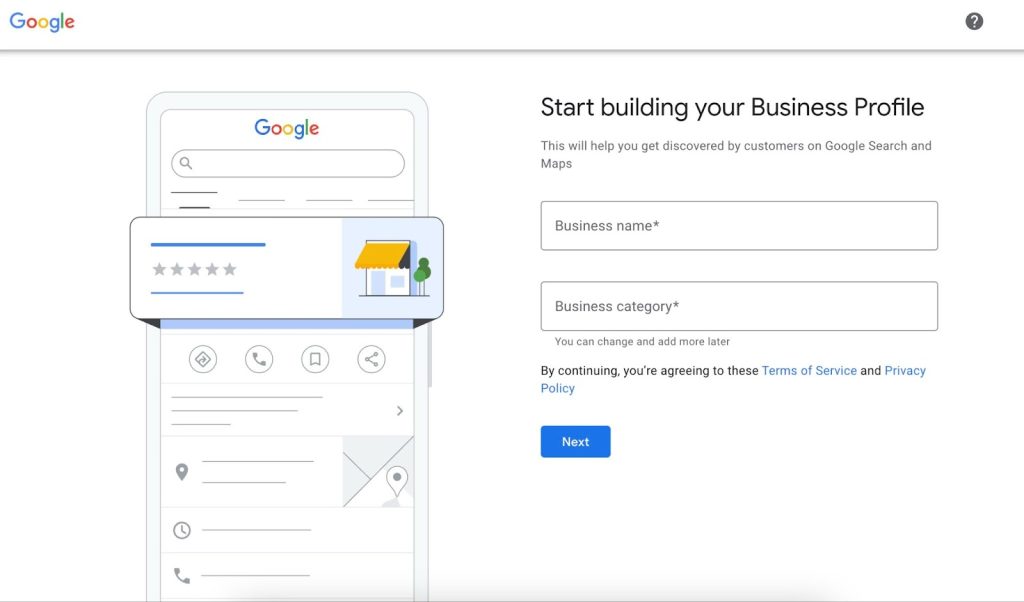
4. Choose your business category.
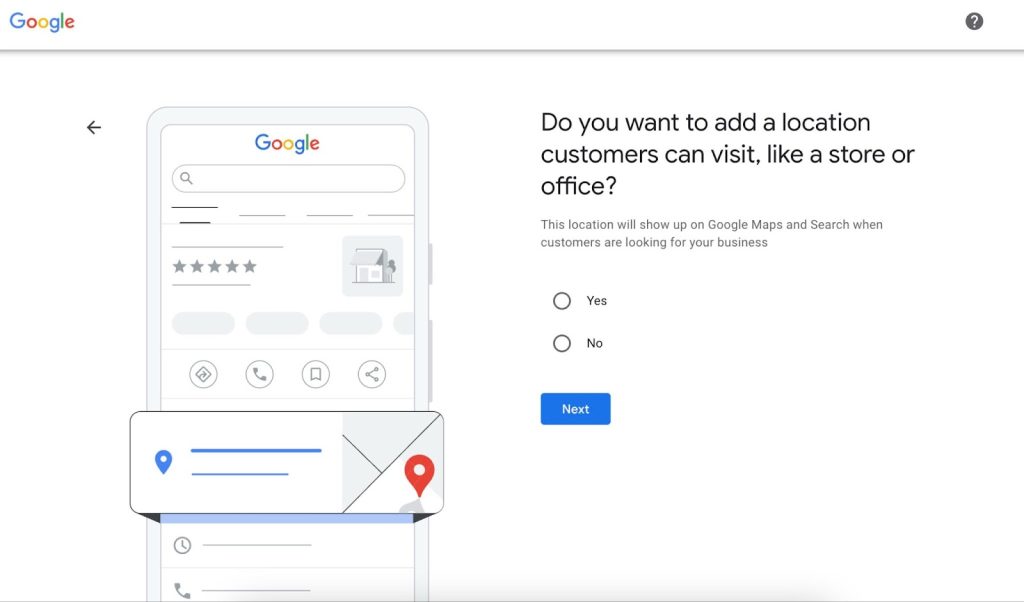
5. Enter Location if physical address. If there is no physical address, press ‘no’. The next screen will ask for service areas.*
5. Add your phone number and website.
6. Verify your business (usually by mail, phone, or email).
The verification process is crucial – it proves to Google that you’re the legitimate owner of the business. Once you’re verified, you’ll have full access to manage your profile.
*Service areas – According to Google,
“To use a service area, your business must be one of the following business types:
Service-area business: A business that visits or delivers to customers directly but doesn’t serve customers at their business address.
- For example, businesses like cleaning services or plumbers.
- Service-area businesses can only create one profile for the metropolitan area that they serve.
Hybrid business: A business that serves customers at their business address but also directly visits or delivers to customers. If your business doesn’t have permanent on-site signage, it’s not eligible as a storefront and should be listed as a service-area business.
- For example, a dine-in restaurant that also delivers food.
Hybrid businesses can show their storefront address, set their hours for when they’re staffed at that address, and designate a service area.”
Google
How To Optimize Your Google My Business
Alright, now that you’ve got your profile set up and verified, let’s make it shine! Here are the key areas to focus on:
1. Complete Every Section
I know it might seem tedious, but trust me, it’s worth it. Fill out every single section of your profile. This includes:
- Business name (use your exact business name, no keyword stuffing!)
- Address
- Phone number
- Website
- Business hours
- Business description
- Services or products
- Attributes (things like “free Wi-Fi” or “wheelchair accessible”)
The more information you provide in your GBP, the easier it is for potential customers to find you and decide to choose your business.
2. Choose the Right Categories
Choosing the right category for your business is crucial. It helps Google understand what your business does and show you in relevant searches. You can choose one primary category and multiple additional categories. Be as specific as possible – for example, if you run a pizza restaurant, don’t just choose “Restaurant” as your category, choose “Pizza Restaurant.”
3. Add High-Quality Photos
A picture is worth a thousand words, right? Well, in the case of your Google Business Profile, it might be worth a thousand customers! Add high-quality photos of your business, including:
- Your storefront
- Interior shots
- Your team
- Your products or services in action
Aim for clear, well-lit photos that truly represent your business. And keep them updated – if you renovate or change your products, update your photos to reflect that.
4. Encourage and Respond to Reviews
Reviews are gold for your Google Business Profile. They not only help potential customers decide whether to choose your business, but they also help your profile rank higher in local search results. Here’s how to make the most of reviews:
- Encourage happy customers to leave reviews
- Respond to all reviews, both positive and negative
- Keep your responses professional and courteous
- Address any issues mentioned in negative reviews and offer solutions
Remember, how you handle negative reviews says a lot about your business. Use them as an opportunity to showcase your excellent customer service!
5. Use Google Posts
Google Posts are like mini-ads or updates that appear on your Google Business Profile. You can use them to share news, promotions, events, or product updates. Here are some ideas:
- Announce a sale or special offer
- Highlight a new product or service
- Share a recent blog post
- Promote an upcoming event
- Posts expire after 7 days (except event posts), so keep them fresh and updated regularly.
6. Add Products and Services
If you sell products or offer services, make sure to add them to your profile. This helps potential customers understand what you offer before they even visit your website or store. Include:
- Product names
- Prices (if applicable)
- Descriptions
- Photos
For services, you can add a list of services you offer along with descriptions.
7. Set Up Messaging
Google offers a messaging feature that allows customers to send you messages directly from your Google Business Profile. If you have the capacity to respond promptly, this can be a great way to engage with potential customers. Just make sure to set up notifications so you don’t miss any messages!
How To Manage Your Google Business Profile
Multi-Locations: Use Google Business Profile Manager Dashboard
Multi-location businesses should utilize the Google Business Profile Manager to efficiently manage profiles for multiple locations or client sites.
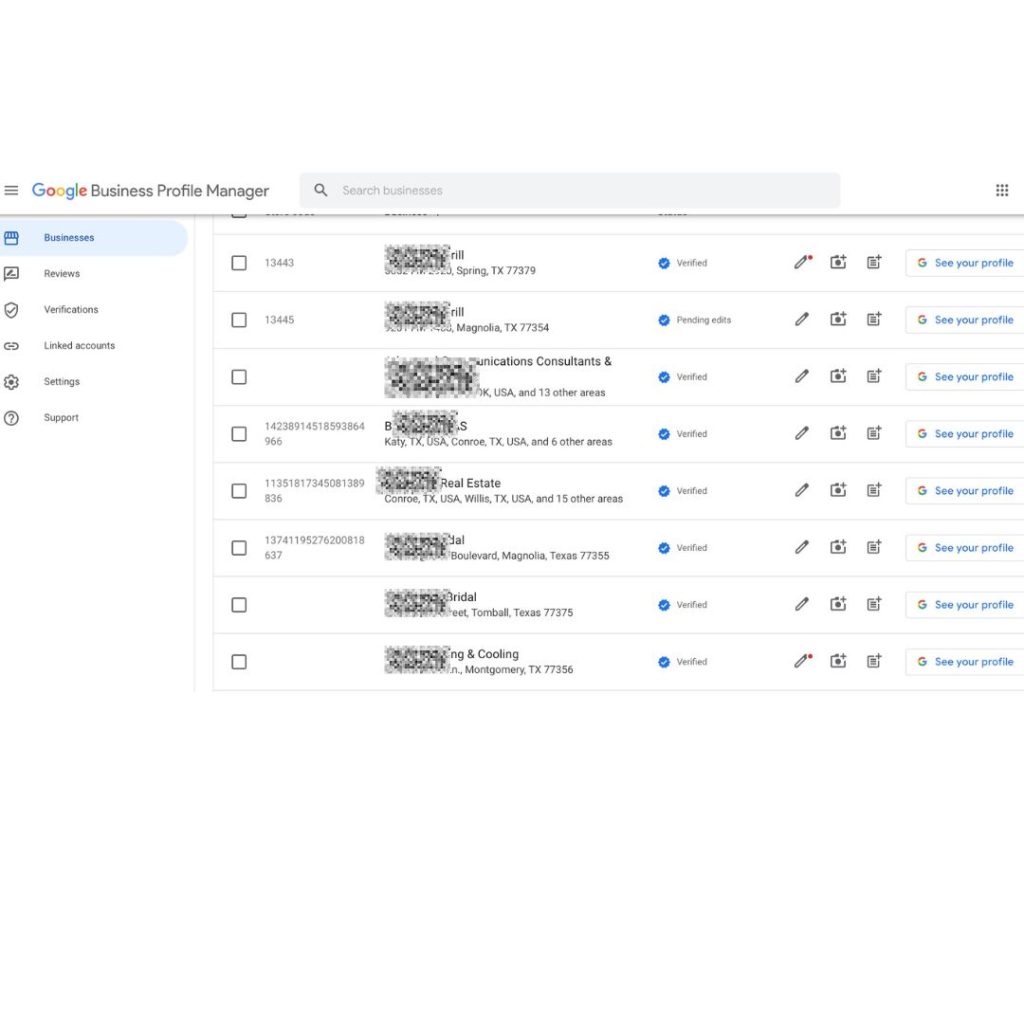
The GBP Manager offers extensive flexibility for handling numerous profiles within a single dashboard.
(Alternatively: You can also manage multiple locations using the Google Maps App on your smartphone.)
Single Location: Manage your Google Business Profile directly from Search or the Google Maps App.
If you operate a local business with a single location, the simplest way to oversee your Google Business Profile (GBP) is through the platform you likely keep open on your computer all day – Google Search!
Additionally, you can manage it directly from the Google Maps App on your smartphone. Wondering how to manage your profile from Search or Maps?
Once logged in with the Gmail address associated with your GBP management, simply enter your business name in the search bar. This action will display your Knowledge Panel/Business Profile along with a GBP merchant panel and click on the 3 dots to manage your profile.
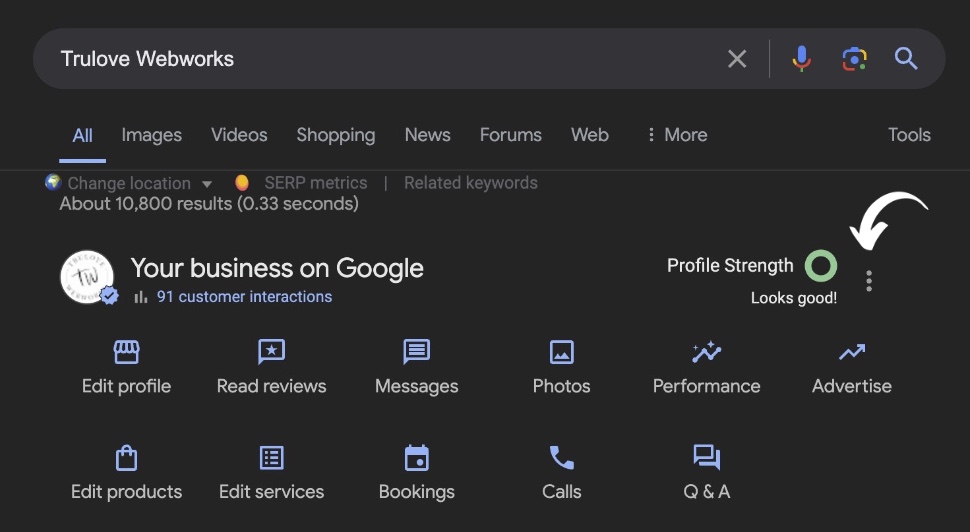
Alternatively, through Google Search, you can enter “my business,” and your merchant panel will appear.
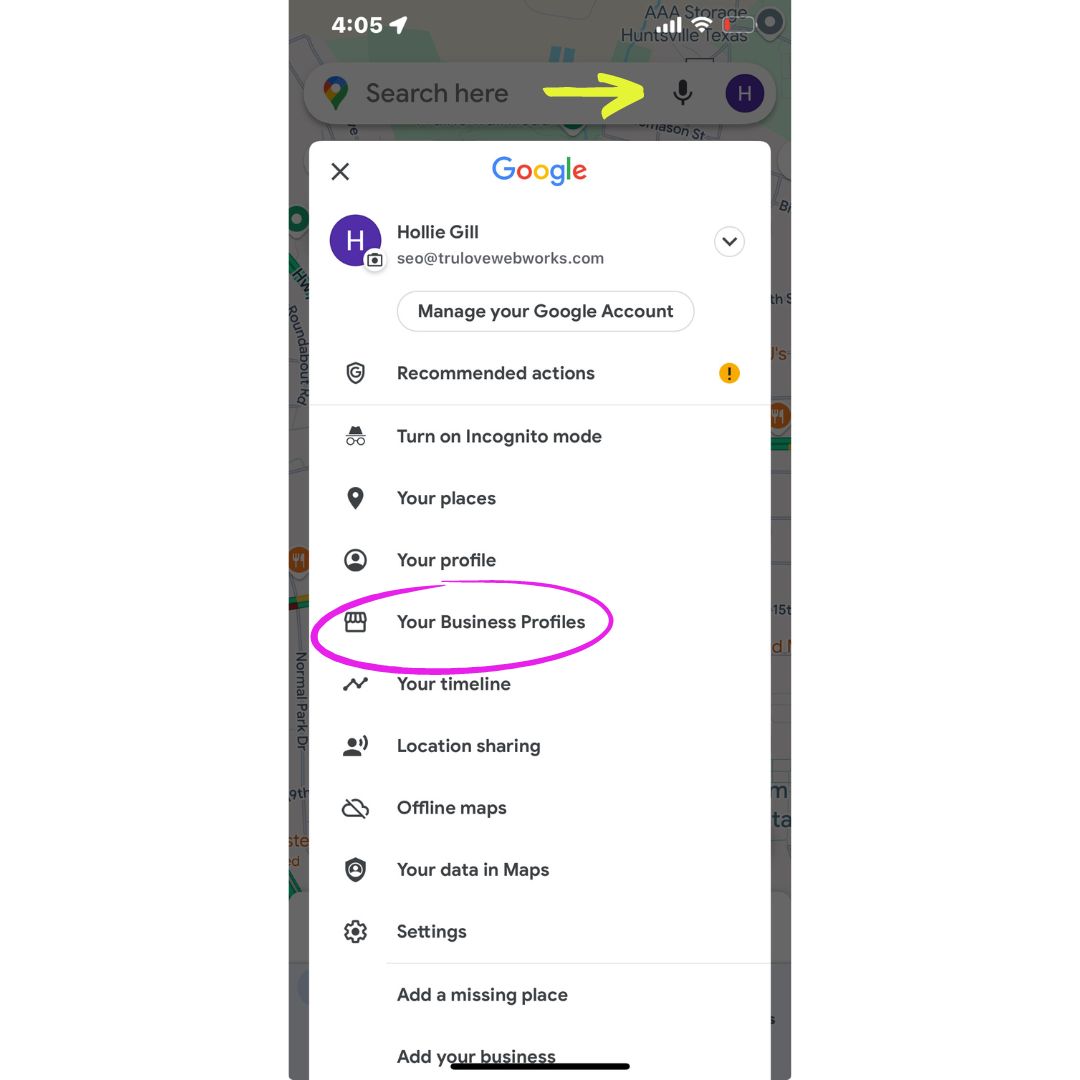
If you’re frequently on the move and occupied, managing your GBP listing is also possible using the Google Maps App. Ensure you’re logged into the email associated with your Business Profile, click on your profile picture, and then select “Your Business Profiles.”
Next, you’ll access your GBP merchant panel, which closely resembles the desktop version. Click on the More or Less arrow to expand or collapse the available options.
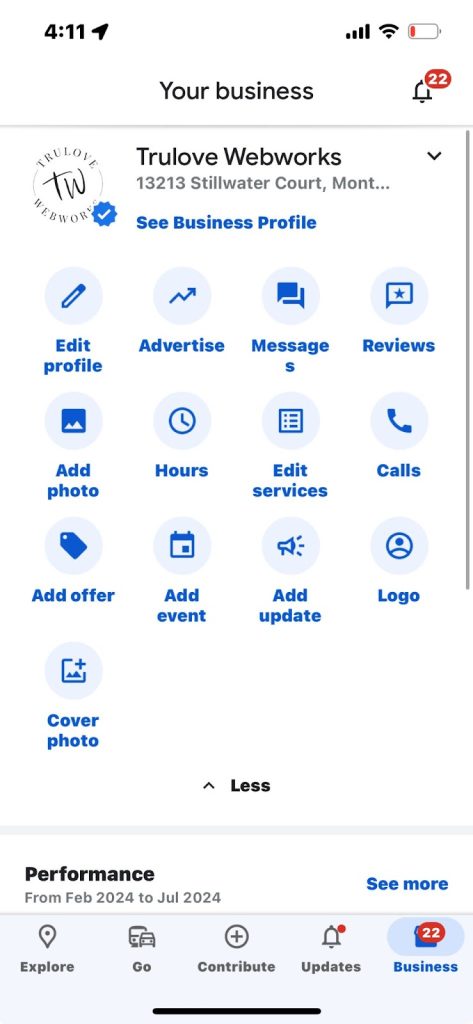
If you oversee multiple GBP listings, you can access those profiles by clicking on the arrow down and that allows you to see all your Google Business Profiles.
How your Google Business Profile Improves SEO Results
I get it – you’re busy running your business, and the last thing you need is another online platform to manage. But here’s the thing: your Google Business Profile can be a game-changer for your local visibility and customer engagement. Here’s why:
GBP Helps Businesses Show Up On Google Searches
When someone in your area searches for products or services you offer, a well-optimized Google Business Profile can help you appear in the local search results and Google Maps.
GBP Provides Crucial Information To Customers
Your profile gives people quick access to your contact info, hours, and location – all the stuff they need to decide whether to visit your business.
GBP Builds Trust Through Reviews
Customer reviews on your profile can help build credibility and trust with potential customers.
GBP Is Free Advertising
Your Google Business Profile is essentially free advertising space on the world’s largest search engine. Why not make the most of it?
Several factors influence how your business ranks in local search results:
- Relevance: It’s crucial that your business is relevant to the search queries users enter. For instance, if someone searches for a coffee shop, they expect to see results for coffee shops, not pizza restaurants. To achieve relevance, incorporate relevant keywords, list your products and services, and create posts that align with your business offerings.
- Distance: Many searches are location-specific. When users search for “coffee shop,” they typically want results that are nearby. Therefore, it’s important to include your address in your Google Business Profile so Google can accurately determine your proximity to the searcher.
- Prominence: Prominence refers to how well-known and reputable your business is, especially within your local community. Building prominence requires effort, such as earning more reviews on Google and encouraging visits to your location through engaging posts, detailed descriptions, and other profile customizations.
These factors—relevance, distance, and prominence—play a critical role in determining where your business appears in local search engine results pages.
Following Google’s GBP Profile Guidelines
Always adhere to Google’s guidelines when managing your GBP. Since you’re operating within Google’s ecosystem, it’s essential to comply with their Business Profile guidelines to avoid potential suspension. Keep in mind that not all local businesses qualify for a GBP.
I recommend checking the guidelines every three to four months to stay updated on any changes that could affect your Business Profile.
Remember, your Google Business Profile is a powerful tool for connecting with local customers and growing your business. It’s worth investing time to get it right.
Why Work With Your North Houston Digital Marketing Agency to Manage Your Google Business Profile
As a small business owner, I know firsthand how challenging it can be to juggle all aspects of running a business while also trying to stay on top of your digital marketing. That’s why we’re here at Trulove Webworks. We’re passionate about helping small businesses like yours succeed online.
We’ve helped numerous North Houston businesses – from mom-and-pop shops to growing enterprises – climb the search rankings and attract more customers. Our clients have seen dramatic increases in website traffic, leads, and revenue as a result of our optimization of GBP and SEO efforts.
Don’t let your business get lost in the depths of search results. Partner with Trulove Webworks and let us help you claim your spot on Google’s first page. Your future customers are searching – make sure they find you first.
So, what are you waiting for? Go ahead and give your Google Business Profile some love. Your future customers are out there searching – make sure they can find you!
Whether you need help optimizing your Google Business Profile, want to improve your overall digital marketing strategy, or just have some questions, we’re always here to help. Don’t hesitate to reach out .
Love it? Share it!

About The Author
I'm KT and I'm the face behind Trulove Webworks. I live in Montgomery, TX with my husband and 3 beautiful daughters. I love design and business strategy but the real reason I do what I do is because I want to see more small businesses thrive.
- Katelyn Trulove
Related Posts

Maximizing Your Google Business Profile: A Step-by-Step Guide for Small Service Based Businesses in Montgomery County
Katelyn Trulove | April 10, 2025
If you own a service-based business in Montgomery County—whether you’re building backyard pools or dream homes—you know how competitive the local market can be. But here’s the good news: with the right tools, you can stand out from the crowd. One of the most powerful tools at your disposal? Your Google Business Profile (GBP). In…

Google Ads vs Social Media Ads: Choosing the Right Strategy for Your Business
Katelyn Trulove | April 10, 2025
Are you a home service provider in Montgomery County, Texas, wondering whether to go all-in with Google Ads or throw some of your marketing budget at social media ads? Well, you’re not alone! One of the biggest questions businesses have today is how to maximize their marketing dollars. At Trulove Webworks, we specialize in helping…

How to Leverage Google Reviews for Business Growth
Katelyn Trulove | April 3, 2025
As a business owner in Montgomery County, you already know that reputation is everything. Sure, providing outstanding services is key, but building that reputation also relies on trust and credibility—something that today’s customers care about more than ever. In a world where online reviews can make or break your business, it’s crucial to pay attention…

Service Area vs Business Location on Your Google Business Profile
Katelyn Trulove | March 3, 2025
Hey there, fellow small business owner! Running a business in Montgomery County (or anywhere, really), means you’ve got a lot on your plate. I get it—between the day-to-day tasks and tackling the big-picture goals, marketing can easily get pushed to the bottom of the list. But here’s one thing to know: your Google Business Profile…

What is SERP? And why is it important for SEO?
Katelyn Trulove | March 3, 2025
When you search for something on Google—whether it’s “best sushi in Houston” or “emergency plumber in Montgomery County”—what happens next? You’re shown a page with a list of results, right? That page is called the Search Engine Results Page (SERP), and if your website isn’t ranking on it, you’re basically invisible to your potential customers….

How Local Sponsorships Can Boost Your Business and Brand Awareness
Katelyn Trulove | February 25, 2025
Tired of shouting into the endless void of the internet, hoping your business somehow stands out amidst the digital chaos? What if I told you there’s a way to seriously level up your marketing—no WiFi, no Google, no social media required? Yep, you heard that right. Although we love a well-targeted social media ad campaign…

Avoid These 5 Google Business Profile Mistakes That Hurt Your Visibility
Katelyn Trulove | February 17, 2025
Hey there, small business superstar! If you’re a service-based business in Montgomery County, Texas—whether you’re in Conroe, Willis, Magnolia, or any of our other cozy corners—you’ve definitely heard about Google Business Profile (formerly Google My Business). It’s a free tool that can make your business easier to find online, and let’s face it, we ALL…

Marketing Ideas to Elevate Your Business
Katelyn Trulove | January 15, 2025
Running a small business in Montgomery County comes with its fair share of challenges. Standing out in a sea of competition can feel like trying to find your car keys in a bottomless purse (we’ve been there a time or two). But don’t worry! With a little creativity and the right marketing strategies, your business…

How to Boost Brand Visibility
Katelyn Trulove | December 18, 2024
So, you’ve got the passion. You’ve got the product. But… you’re still struggling to get noticed? We get it. It’s tough out there! In a sea of big-name brands and shiny new startups, for a small business in Montgomery, Texas, it can feel like you’re shouting into the void. But don’t worry—this post is your…

8 Marketing Ideas That Every Small Business Needs to Know
Katelyn Trulove | November 22, 2024
Let’s be honest—running a small business is like juggling flaming swords while riding a unicycle. It’s exciting, a little chaotic, and sometimes, it feels like you’re just one step away from setting something on fire. But here’s the good news: marketing doesn’t have to be a circus act. With the right strategies in place, you…
- « Previous
- 1
- 2
- 3
- 4
- Next »

Serving Montgomery, TX, Magnolia, TX, Conroe, TX, Tomball, TX, The Woodlands, and all of The Greater Houston Area
832-349-4231
© Trulove Webworks 2024