

If you own a service-based business in Montgomery County—whether you’re building backyard pools or dream homes—you know how competitive the local market can be. But here’s the good news: with the right tools, you can stand out from the crowd. One of the most powerful tools at your disposal? Your Google Business Profile (GBP). In this step-by-step guide, we’re going to walk you through the process of maximizing your Google Business Profile so you can get more leads, more customers, and ultimately, more business.
Why Google Business Profile Matters for Service-Based Businesses
Before we dive into the “how,” let’s talk about why your Google Business Profile matters. For a local business, especially one that deals with larger, service-based jobs, your Google Business Profile is your digital storefront. It’s the first thing many potential customers see when they search for your services on Google.
Google’s search engine pulls information from your profile to help users find relevant, nearby businesses that fit their needs. For example, when someone searches for “pool builders near me” or “home builders in Montgomery County,” your business could be one of the first results they see. And we all know, the higher you rank, the better your chances of landing that dream project.
How Local Businesses Can Get the Most Out of Their Google Business Profile
Step 1: Claim Your Google Business Profile (If You Haven’t Already)
First things first: if you don’t have a Google Business Profile set up yet, you need to claim one. It’s free, and trust us—it’s worth every minute. If you’re not sure how to add or claim your Google Business Profile on Google, follow this guide. Google will review your information and prompt you to verify your business.
Once you’re verified, you’ll be able to access and manage your Google Business Profile.
Step 2: Optimize Your Profile with Accurate, Up-to-Date Information
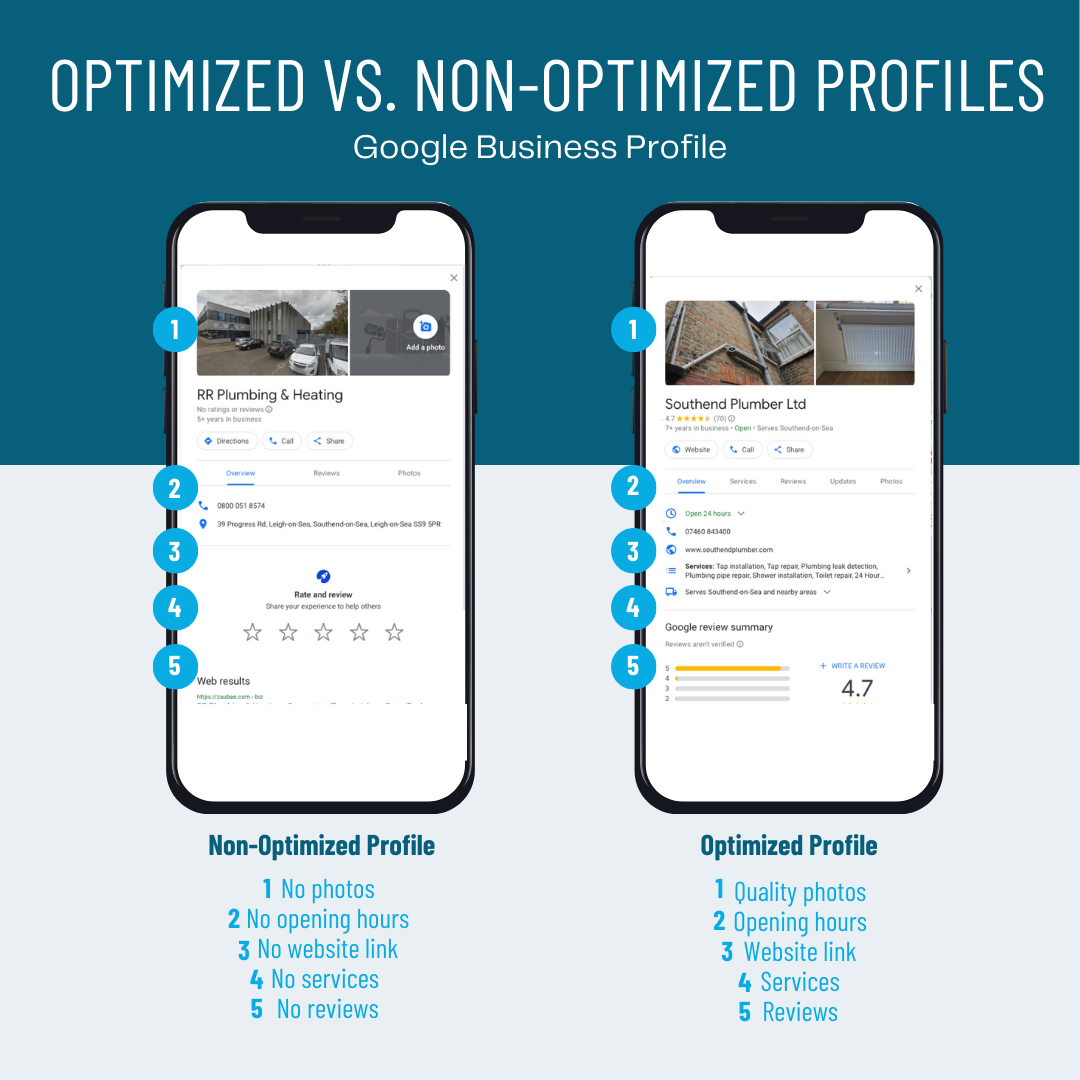
Photo Credit: Ignite Visibility
The next step is to fill in all the important details about your business. You want your Google Business Profile to paint an accurate picture of who you are and what you offer. The more detailed and precise your profile is, the better your chances of ranking higher in search results.
Here are some key areas to focus on:
- Business Name: Make sure your business name is consistent across all your online listings, and that it’s easy to find. No need for unnecessary keywords here—just your business name as it appears in real life.
- Business Address: For service-based businesses, you can choose whether you want to display your address or hide it (useful if you work from a home office or a job site). If you serve specific areas, like Montgomery County, be sure to list your service areas. You can read more about Service Area vs Business Location here.
- Phone Number & Website: Ensure your contact details are correct and easily accessible. A potential customer might need to call you for a quote or visit your website for more information—make it easy for them to do both.
- Business Hours: Keep your hours updated, especially if your service hours change seasonally. Clients who are looking to schedule a consultation or project might call outside regular business hours, so you want to show them when they can reach you.
Step 3: Add Photos That Showcase Your Work
You don’t need us to tell you that in today’s ultra-digital world, visuals speak volumes. Show off your work with high-quality photos that highlight your best projects—whether it’s a sleek pool installation or a gorgeous new kitchen you just remodeled. Potential clients love to see what you’re capable of!
Here’s what to focus on:
- Before-and-after photos: These are gold! Show your potential clients the transformation your service can bring.
- Project shots: Showcase the variety of work you do—big or small, your photos should tell the story of your expertise.
- Team photos: Personalize your business! Show your team in action so customers can see who they’ll be working with. A smiling crew can go a long way toward building trust.
Not sure where to start with adding photos to your local business on Google? Check out this guide!
Step 4: Collect & Respond to Reviews
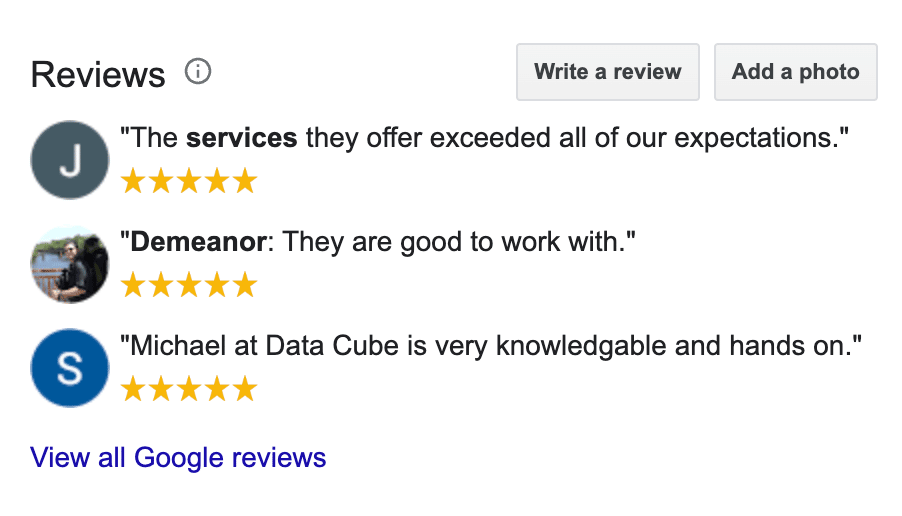
Photo Credit: Pronto Marketing
Let’s be honest: people trust online reviews. They want to hear about the experiences others have had with your business before they take the leap and hire you. In fact, according to Trustmary, eCommerce websites experienced a 67% increase in online conversions when visitors saw customer reviews on the site.This is especially true for larger service-based jobs, where the investment is significant.
Encourage your satisfied customers to leave glowing reviews on your Google Business Profile. Here’s how:
- Ask for reviews: Don’t be shy about asking happy customers for feedback. A simple follow-up email or text message can work wonders.
- Respond to reviews: Whether the review is positive or not-so-positive, always take the time to respond. A friendly, professional reply shows that you value your customers and care about their experience. It also improves your visibility in search results.
If you’re struggling to make your Google reviews work for you, read our blog about how to use Google reviews to boost your business!
Step 5: Use Google Posts to Keep Customers Updated
Google Posts are a fantastic way to share updates, special offers, or relevant content right on your profile. Whether you’re announcing a seasonal discount or showcasing a recent project, Google Posts let you keep potential customers in the loop.
Pro tips for posts:
- Share behind-the-scenes content or time-lapse videos of big projects.
- Announce limited-time offers or discounts to attract more leads.
- Post seasonal tips related to your services (e.g., “Get Your Pool Ready for Summer—Schedule Your Maintenance Now!”).
Tip: Don’t forget to add an eye-catching call to action (CTA) like “Call Now,” “Get a Quote,” or “Book an Appointment.” You want customers to take action.
Step 6: Monitor Insights to Track Your Success
Your Google Business Profile isn’t just a static page—it’s a dynamic tool that provides valuable insights. Keep an eye on the data to understand how your profile is performing and where there’s room for improvement. You can track:
- How many people are viewing your profile
- Where they’re finding you (search vs. map)
- How they’re interacting with your profile (calls, website clicks, requests for directions)
Explore more about Google Business Profile insights for your local business here.
Use these insights to fine-tune your strategy. If you’re getting a lot of website clicks but not many calls, it might be time to revisit your website’s user experience or add more compelling CTAs to your profile.
Level Up Your Google Business Profile With Trulove Webworks
Maximizing your Google Business Profile is one of the smartest ways to grow your service-based business in Montgomery County. So, take a few minutes to revisit your profile, make those updates, and start reaping the rewards.
If the thought of managing all of this sounds overwhelming, don’t worry—Trulove Webworks specializes in helping businesses like yours get seen on Google and we’re here to help! We take care of the details for you, from responding to reviews to crafting eye-catching Google posts. Let us handle the heavy lifting so your Google Business Profile stays in tip-top shape, helping you attract more local clients and grow your business with ease.
Ready to take your Google Business Profile to the next level? Explore our packages and book a consultation today.
Happy optimizing!
Love it? Share it!

About The Author
I'm KT and I'm the face behind Trulove Webworks. I live in Montgomery, TX with my husband and 3 beautiful daughters. I love design and business strategy but the real reason I do what I do is because I want to see more small businesses thrive.
- Katelyn Trulove
Related Posts

Is Your Website Even Visible in Google’s AI Overviews? Here’s How to Find Out
Katelyn Trulove | September 18, 2026
Quick question: when someone searches for a business like yours on Google, are you actually showing up? Not “are you ranking on page one” — that’s the old question. The new question is whether you’re showing up in the AI-generated summary that now appears at the top of most Google searches, before anyone even scrolls…

What Are AI Overviews? A Plain-English Guide for Local Business Owners
Katelyn Trulove | September 16, 2026
If you’ve noticed Google’s search results look a little different lately — a summary box sitting above the usual list of links — you’re not imagining things. That’s called an AI Overview, and it’s become one of the biggest changes to how Google works in years. We talk to a lot of business owners who’ve…

5 Signs Your Website Isn’t Ready for AI-Powered Search
Katelyn Trulove | September 16, 2026
Search has changed fast this year. AI Overviews — the AI-generated summaries now sitting above traditional Google results — reach over 2.5 billion people a month, according to Dataconomy, and Search Engine Land reports that zero-click searches (where someone gets their answer without clicking any website at all) are now as high as 68% of…

Why Authentic Content Is Becoming Your Best Search Visibility Strategy
Katelyn Trulove | September 16, 2026
Google just rolled out another spam update aimed at AI-generated and mass-produced content. Nextdoor just rolled out verified business pages built to be a lot harder to fake than your typical review platform. Two different companies, two different products, but they’re both pointing at the same thing: the platforms your customers use every day are…
How to Write Content That Actually Sounds Like You
Katelyn Trulove | September 16, 2026
We recently wrote about why authentic content is becoming your best search visibility strategy — the short version is that Google’s latest spam update specifically targets mass-produced, AI-stuffed content, and rewards the businesses saying real, useful things about what they actually do. Great, but “be authentic” isn’t exactly a to-do list. So here’s what that…
Where Your Customers Are Really Looking: A Local Trust Checklist
Katelyn Trulove | September 16, 2026
You could have the best website in Montgomery County, and still lose a customer before they ever click on it. In our last post, we talked about why authentic content is winning right now, both with Google and with real customers. But your website is only one stop on a much longer customer journey. Before…

Local Web Design & SEO Companies Near Montgomery, TX: A 2026 Comparison
Katelyn Trulove | September 15, 2026
If you’ve searched “web design near me” or “SEO company Montgomery TX,” you’ve probably noticed the same problem we ran into: most of what shows up isn’t actually local. It’s a national company that generates a landing page for every city in the country, purely to rank for that search. We wanted an honest answer…

AI Overviews and Accessibility Lawsuits: What They Have in Common (and What They Mean for Your Website)
Katelyn Trulove | September 15, 2026
Two things happened this year that, on the surface, don’t seem related at all. Google quietly gave every website owner a new way to see how often they’re showing up in AI Overviews — the AI-generated summaries that now sit at the top of a lot of Google searches. And in the world of website…

Is Your Cookie Banner Actually Doing Its Job?
Katelyn Trulove | September 15, 2026
If you’ve clicked “Accept” on a cookie banner today without reading it, you’re not alone — most people do the same thing. But that little popup that shows up the moment someone lands on your website is doing more (or less) than you might think. It can be a genuine accessibility barrier, a privacy-law gap,…

Google Business Profile Clicks Are Down. Does That Mean Your Local SEO Isn’t Working?
Katelyn Trulove | September 15, 2026
If you’ve looked at your Google Business Profile performance recently and noticed fewer website clicks or calls, it’s easy to assume something is wrong. But new 2026 data suggests there may be a bigger shift happening in how people use Google to find and choose local businesses. According to Q2 2026 Google Business Profile data…


Serving Montgomery, TX, Magnolia, TX, Conroe, TX, Tomball, TX, The Woodlands, and all of The Greater Houston Area
832-349-4231
© Trulove Webworks 2024