
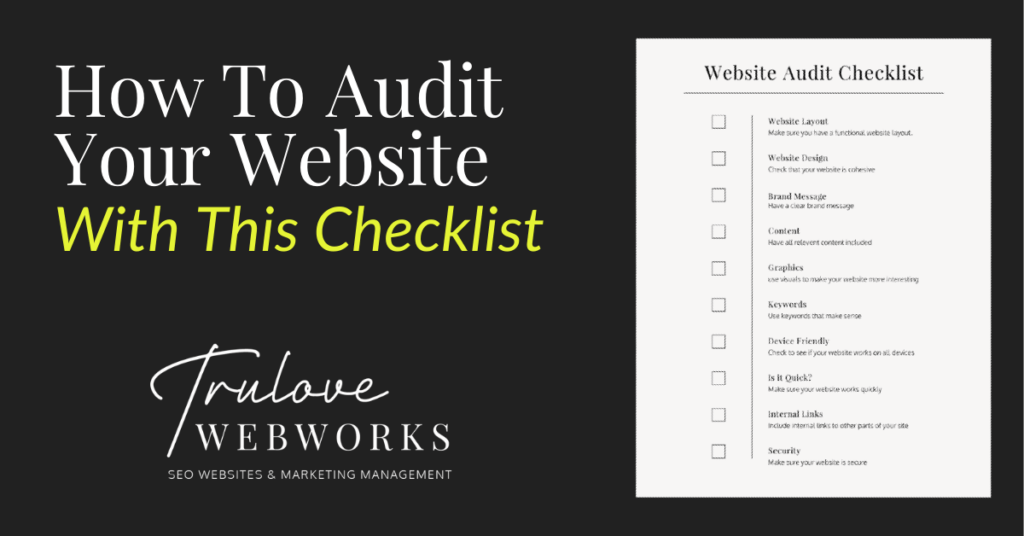
Creating a good website is an important step to creating a good business. Auditing your website sounds like a scary and time-consuming task but it’s really simple. It can help you identify what works and what doesn’t, that way you can get more leads and improve your SEO. Here are some items to consider to make sure your site is working well and drawing people in.

Complete Audit Checklist
Visual Impressions
1: Website Layout
Why it’s important:
Having a well-laid-out website helps increase its functionality for those who visit your site. If your site is difficult to navigate and hard to use then customers will leave and you lose a potential sale. Also, when users aren’t staying on your site long enough, google assumes it’s a bad website and lowers your SEO ranking. Creating a well-thought-out website with relevant pages will help lead your customers right into your arms and get that SEO rank up!
How to check for it:
Make sure you have pages on your site that include content that is relevant to your business. Including a business statement, about information, services, accreditations, testimonials, faq’s and contact information is a good place to start. Also, check to see if you can get to each page easily and quickly and everything is easy to read. Friends are great for this. Have someone whose honest opinion you value go to your site and look for a specific piece of information, then ask them how easy or difficult it was to find.
2: Website Design
Why it’s important:
Having cohesive branding throughout your site helps create your business image. Whether you have what they are looking for or not, your design is going to make the biggest initial impression. Make it a good one. A well-designed website looks more professional and helps customers understand who you are. Design elements include your logo, font and color usage, and imagery used. But none of that means anything if your website design doesn’t evoke the feeling you are trying to convey or illustrate your company’s culture to the user. For SEO purposes, a captivating website design will increase how long someone stays on your site thus better SEO (See the theme? If users like it, Google does too!)
How to check for it:
Close your eyes, click a link to your website and open them up right as it loads. Without any attachment to the investment you’ve made in your website and your brand, ask yourself; how does it make you feel? Do you immediately know what the company does? Does it truly represent your brand? Then as you flow through the page, check to see that every design element is cohesive and aesthetically. When all else fails, ask a friend.
3: Your Brand’s Message
Why it’s important:
Establishing your brand’s messaging is basically just narrowing down your target audience and defining how you serve them. Making this message clear throughout your website design & content will help visitors know immediately what you are about. If they feel like they can relate, you’ve just earned yourself a loyal customer!
How to check for it:
When looking through your website, check that the tone is consistent and the audience is clear. Once you’ve established who you’re talking to, check that you are using language that persuades them to take immediate action.
4. Content
Why it’s important:
The actual content on your website is what will let potential customers know what you actually do and can help increase your SEO(more about that below). Your content includes what you provide for your customers, relevant images, your brand’s purpose and so much more! This is where you sell what you do.
How to check for it:
This one is easy. Any question a customer has ever asked or may ask in the future needs to be readily accessible within your content. If the question is better answered in a consultation, at least address the question and encourage them to contact you for more information.
5. Graphics
Why it’s important:
Most people are visual learners so including some pictures or videos can help add to what your business does and keep users interested in your website.
How to check for it:
Check to see that you include images that are relevant to what you do. Make sure that these images are optimized for the web (This means they are sized correctly and named to be descriptive & SEO friendly). You can utilize stock photos but you can also include your own pictures. Just make sure they look professional!

Technical Audit Checklist
6. Keywords
Why it’s important:
Here is where technical SEO comes in. Keywords are incredibly important to boosting your SEO. Using the right words within your content helps search engines know what your website is about and can help lead users in the right direction.
How to check for it:
Make a list of things you think potential customers will put into their search bar to find you. They can be longer phrases or just a few words. The key is finding the search terms that will lead the right people to you, rather than casting a huge net and hoping you catch something good. Once you have your list, check in your page titles, headings, subheadings, and paragraph text to see that you are including some of these words.
7. Device friendly
Why it’s important:
You want your website to work across all devices (mobile, tablets, and computers). This will help you be reached more easily and help increase your SEO.
How to check for it:
You can check this by using Google’s mobile friendly test or just look at your site through a tablet or phone to make sure everything looks and works how it should!
8. Is it Quick?
Why it’s important:
If users have to wait for your website to load for too long they will get frustrated and leave. This will lower your SEO rank.
How to check for it:
There are many ways to check if your website is speedy. Using free resources that can check your website like Google’s PageSpeed can help. Also just checking your site for yourself can help you identify what needs to be fixed.
9. Internal Links
Why it’s important:
Internal links help navigate users to different parts of your site easily. This helps improve the way your site can be navigated and helps it have a higher SEO rank.
How to check for it:
If you are referencing another subject on your site make sure the text is linked to the page where they can find more information.
10. Security
Why it’s important:
Search engines want their users to be cybersafe so anytime your site gets breached they penalize your SEO.
How to check for it:
Make sure you are maintaining your site and using SSL certificates to keep it secure!

Checking that your website includes all of these elements can help improve your SEO ranking and generate those important leads. The word audit can sound terrifying but as soon as you get started it’s easy!
Need help with your website audit? Give us a call!
Looking for some marketing tools? Look here at some that we recommend!
Love it? Share it!

About The Author
I'm KT and I'm the face behind Trulove Webworks. I live in Montgomery, TX with my husband and 3 beautiful daughters. I love design and business strategy but the real reason I do what I do is because I want to see more small businesses thrive.
- Katelyn Trulove
Related Posts
Is Your Website Even Visible in Google’s AI Overviews? Here’s How to Find Out
Katelyn Trulove | September 18, 2026
Quick question: when someone searches for a business like yours on Google, are you actually showing up? Not “are you ranking on page one” — that’s the old question. The new question is whether you’re showing up in the AI-generated summary that now appears at the top of most Google searches, before anyone even scrolls…

What Are AI Overviews? A Plain-English Guide for Local Business Owners
Katelyn Trulove | September 16, 2026
If you’ve noticed Google’s search results look a little different lately — a summary box sitting above the usual list of links — you’re not imagining things. That’s called an AI Overview, and it’s become one of the biggest changes to how Google works in years. We talk to a lot of business owners who’ve…
5 Signs Your Website Isn’t Ready for AI-Powered Search
Katelyn Trulove | September 16, 2026
Search has changed fast this year. AI Overviews — the AI-generated summaries now sitting above traditional Google results — reach over 2.5 billion people a month, according to Dataconomy, and Search Engine Land reports that zero-click searches (where someone gets their answer without clicking any website at all) are now as high as 68% of…

Why Authentic Content Is Becoming Your Best Search Visibility Strategy
Katelyn Trulove | September 16, 2026
Google just rolled out another spam update aimed at AI-generated and mass-produced content. Nextdoor just rolled out verified business pages built to be a lot harder to fake than your typical review platform. Two different companies, two different products, but they’re both pointing at the same thing: the platforms your customers use every day are…

How to Write Content That Actually Sounds Like You
Katelyn Trulove | September 16, 2026
We recently wrote about why authentic content is becoming your best search visibility strategy — the short version is that Google’s latest spam update specifically targets mass-produced, AI-stuffed content, and rewards the businesses saying real, useful things about what they actually do. Great, but “be authentic” isn’t exactly a to-do list. So here’s what that…
Where Your Customers Are Really Looking: A Local Trust Checklist
Katelyn Trulove | September 16, 2026
You could have the best website in Montgomery County, and still lose a customer before they ever click on it. In our last post, we talked about why authentic content is winning right now, both with Google and with real customers. But your website is only one stop on a much longer customer journey. Before…

Local Web Design & SEO Companies Near Montgomery, TX: A 2026 Comparison
Katelyn Trulove | September 15, 2026
If you’ve searched “web design near me” or “SEO company Montgomery TX,” you’ve probably noticed the same problem we ran into: most of what shows up isn’t actually local. It’s a national company that generates a landing page for every city in the country, purely to rank for that search. We wanted an honest answer…

AI Overviews and Accessibility Lawsuits: What They Have in Common (and What They Mean for Your Website)
Katelyn Trulove | September 15, 2026
Two things happened this year that, on the surface, don’t seem related at all. Google quietly gave every website owner a new way to see how often they’re showing up in AI Overviews — the AI-generated summaries that now sit at the top of a lot of Google searches. And in the world of website…

Is Your Cookie Banner Actually Doing Its Job?
Katelyn Trulove | September 15, 2026
If you’ve clicked “Accept” on a cookie banner today without reading it, you’re not alone — most people do the same thing. But that little popup that shows up the moment someone lands on your website is doing more (or less) than you might think. It can be a genuine accessibility barrier, a privacy-law gap,…

Google Business Profile Clicks Are Down. Does That Mean Your Local SEO Isn’t Working?
Katelyn Trulove | September 15, 2026
If you’ve looked at your Google Business Profile performance recently and noticed fewer website clicks or calls, it’s easy to assume something is wrong. But new 2026 data suggests there may be a bigger shift happening in how people use Google to find and choose local businesses. According to Q2 2026 Google Business Profile data…


Serving Montgomery, TX, Magnolia, TX, Conroe, TX, Tomball, TX, The Woodlands, and all of The Greater Houston Area
832-349-4231
© Trulove Webworks 2024