
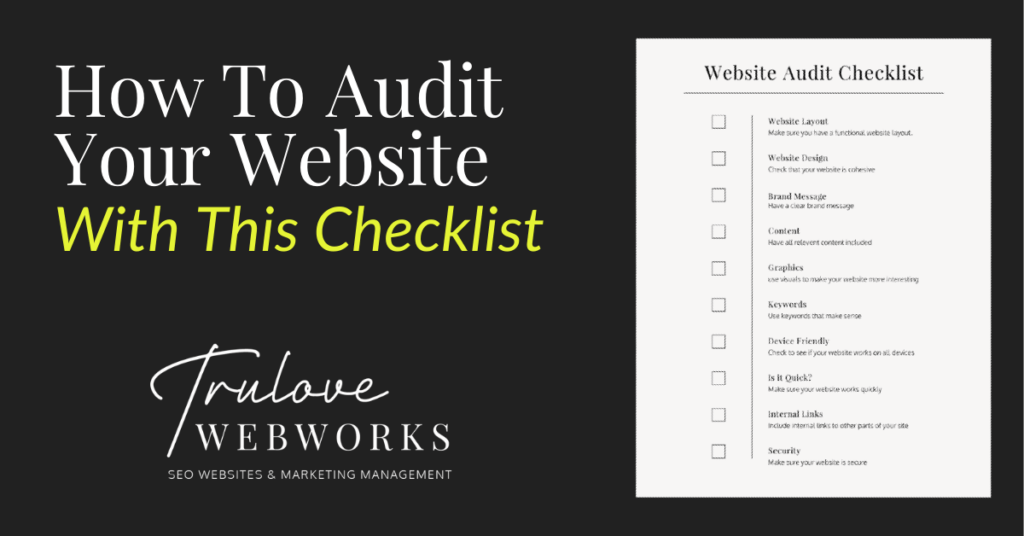
Creating a good website is an important step to creating a good business. Auditing your website sounds like a scary and time-consuming task but it’s really simple. It can help you identify what works and what doesn’t, that way you can get more leads and improve your SEO. Here are some items to consider to make sure your site is working well and drawing people in.

Complete Audit Checklist
Visual Impressions
1: Website Layout
Why it’s important:
Having a well-laid-out website helps increase its functionality for those who visit your site. If your site is difficult to navigate and hard to use then customers will leave and you lose a potential sale. Also, when users aren’t staying on your site long enough, google assumes it’s a bad website and lowers your SEO ranking. Creating a well-thought-out website with relevant pages will help lead your customers right into your arms and get that SEO rank up!
How to check for it:
Make sure you have pages on your site that include content that is relevant to your business. Including a business statement, about information, services, accreditations, testimonials, faq’s and contact information is a good place to start. Also, check to see if you can get to each page easily and quickly and everything is easy to read. Friends are great for this. Have someone whose honest opinion you value go to your site and look for a specific piece of information, then ask them how easy or difficult it was to find.
2: Website Design
Why it’s important:
Having cohesive branding throughout your site helps create your business image. Whether you have what they are looking for or not, your design is going to make the biggest initial impression. Make it a good one. A well-designed website looks more professional and helps customers understand who you are. Design elements include your logo, font and color usage, and imagery used. But none of that means anything if your website design doesn’t evoke the feeling you are trying to convey or illustrate your company’s culture to the user. For SEO purposes, a captivating website design will increase how long someone stays on your site thus better SEO (See the theme? If users like it, Google does too!)
How to check for it:
Close your eyes, click a link to your website and open them up right as it loads. Without any attachment to the investment you’ve made in your website and your brand, ask yourself; how does it make you feel? Do you immediately know what the company does? Does it truly represent your brand? Then as you flow through the page, check to see that every design element is cohesive and aesthetically. When all else fails, ask a friend.
3: Your Brand’s Message
Why it’s important:
Establishing your brand’s messaging is basically just narrowing down your target audience and defining how you serve them. Making this message clear throughout your website design & content will help visitors know immediately what you are about. If they feel like they can relate, you’ve just earned yourself a loyal customer!
How to check for it:
When looking through your website, check that the tone is consistent and the audience is clear. Once you’ve established who you’re talking to, check that you are using language that persuades them to take immediate action.
4. Content
Why it’s important:
The actual content on your website is what will let potential customers know what you actually do and can help increase your SEO(more about that below). Your content includes what you provide for your customers, relevant images, your brand’s purpose and so much more! This is where you sell what you do.
How to check for it:
This one is easy. Any question a customer has ever asked or may ask in the future needs to be readily accessible within your content. If the question is better answered in a consultation, at least address the question and encourage them to contact you for more information.
5. Graphics
Why it’s important:
Most people are visual learners so including some pictures or videos can help add to what your business does and keep users interested in your website.
How to check for it:
Check to see that you include images that are relevant to what you do. Make sure that these images are optimized for the web (This means they are sized correctly and named to be descriptive & SEO friendly). You can utilize stock photos but you can also include your own pictures. Just make sure they look professional!

Technical Audit Checklist
6. Keywords
Why it’s important:
Here is where technical SEO comes in. Keywords are incredibly important to boosting your SEO. Using the right words within your content helps search engines know what your website is about and can help lead users in the right direction.
How to check for it:
Make a list of things you think potential customers will put into their search bar to find you. They can be longer phrases or just a few words. The key is finding the search terms that will lead the right people to you, rather than casting a huge net and hoping you catch something good. Once you have your list, check in your page titles, headings, subheadings, and paragraph text to see that you are including some of these words.
7. Device friendly
Why it’s important:
You want your website to work across all devices (mobile, tablets, and computers). This will help you be reached more easily and help increase your SEO.
How to check for it:
You can check this by using Google’s mobile friendly test or just look at your site through a tablet or phone to make sure everything looks and works how it should!
8. Is it Quick?
Why it’s important:
If users have to wait for your website to load for too long they will get frustrated and leave. This will lower your SEO rank.
How to check for it:
There are many ways to check if your website is speedy. Using free resources that can check your website like Google’s PageSpeed can help. Also just checking your site for yourself can help you identify what needs to be fixed.
9. Internal Links
Why it’s important:
Internal links help navigate users to different parts of your site easily. This helps improve the way your site can be navigated and helps it have a higher SEO rank.
How to check for it:
If you are referencing another subject on your site make sure the text is linked to the page where they can find more information.
10. Security
Why it’s important:
Search engines want their users to be cybersafe so anytime your site gets breached they penalize your SEO.
How to check for it:
Make sure you are maintaining your site and using SSL certificates to keep it secure!

Checking that your website includes all of these elements can help improve your SEO ranking and generate those important leads. The word audit can sound terrifying but as soon as you get started it’s easy!
Need help with your website audit? Give us a call!
Looking for some marketing tools? Look here at some that we recommend!
Love it? Share it!

About The Author
I'm KT and I'm the face behind Trulove Webworks. I live in Montgomery, TX with my husband and 3 beautiful daughters. I love design and business strategy but the real reason I do what I do is because I want to see more small businesses thrive.
- Katelyn Trulove
Related Posts

Maximizing Your Google Business Profile: A Step-by-Step Guide for Small Service Based Businesses in Montgomery County
Katelyn Trulove | April 10, 2025
If you own a service-based business in Montgomery County—whether you’re building backyard pools or dream homes—you know how competitive the local market can be. But here’s the good news: with the right tools, you can stand out from the crowd. One of the most powerful tools at your disposal? Your Google Business Profile (GBP). In…

Google Ads vs Social Media Ads: Choosing the Right Strategy for Your Business
Katelyn Trulove | April 10, 2025
Are you a home service provider in Montgomery County, Texas, wondering whether to go all-in with Google Ads or throw some of your marketing budget at social media ads? Well, you’re not alone! One of the biggest questions businesses have today is how to maximize their marketing dollars. At Trulove Webworks, we specialize in helping…

How to Leverage Google Reviews for Business Growth
Katelyn Trulove | April 3, 2025
As a business owner in Montgomery County, you already know that reputation is everything. Sure, providing outstanding services is key, but building that reputation also relies on trust and credibility—something that today’s customers care about more than ever. In a world where online reviews can make or break your business, it’s crucial to pay attention…

Service Area vs Business Location on Your Google Business Profile
Katelyn Trulove | March 3, 2025
Hey there, fellow small business owner! Running a business in Montgomery County (or anywhere, really), means you’ve got a lot on your plate. I get it—between the day-to-day tasks and tackling the big-picture goals, marketing can easily get pushed to the bottom of the list. But here’s one thing to know: your Google Business Profile…

What is SERP? And why is it important for SEO?
Katelyn Trulove | March 3, 2025
When you search for something on Google—whether it’s “best sushi in Houston” or “emergency plumber in Montgomery County”—what happens next? You’re shown a page with a list of results, right? That page is called the Search Engine Results Page (SERP), and if your website isn’t ranking on it, you’re basically invisible to your potential customers….

How Local Sponsorships Can Boost Your Business and Brand Awareness
Katelyn Trulove | February 25, 2025
Tired of shouting into the endless void of the internet, hoping your business somehow stands out amidst the digital chaos? What if I told you there’s a way to seriously level up your marketing—no WiFi, no Google, no social media required? Yep, you heard that right. Although we love a well-targeted social media ad campaign…

Avoid These 5 Google Business Profile Mistakes That Hurt Your Visibility
Katelyn Trulove | February 17, 2025
Hey there, small business superstar! If you’re a service-based business in Montgomery County, Texas—whether you’re in Conroe, Willis, Magnolia, or any of our other cozy corners—you’ve definitely heard about Google Business Profile (formerly Google My Business). It’s a free tool that can make your business easier to find online, and let’s face it, we ALL…

Marketing Ideas to Elevate Your Business
Katelyn Trulove | January 15, 2025
Running a small business in Montgomery County comes with its fair share of challenges. Standing out in a sea of competition can feel like trying to find your car keys in a bottomless purse (we’ve been there a time or two). But don’t worry! With a little creativity and the right marketing strategies, your business…

How to Boost Brand Visibility
Katelyn Trulove | December 18, 2024
So, you’ve got the passion. You’ve got the product. But… you’re still struggling to get noticed? We get it. It’s tough out there! In a sea of big-name brands and shiny new startups, for a small business in Montgomery, Texas, it can feel like you’re shouting into the void. But don’t worry—this post is your…

8 Marketing Ideas That Every Small Business Needs to Know
Katelyn Trulove | November 22, 2024
Let’s be honest—running a small business is like juggling flaming swords while riding a unicycle. It’s exciting, a little chaotic, and sometimes, it feels like you’re just one step away from setting something on fire. But here’s the good news: marketing doesn’t have to be a circus act. With the right strategies in place, you…
- « Previous
- 1
- 2
- 3
- 4
- Next »

Serving Montgomery, TX, Magnolia, TX, Conroe, TX, Tomball, TX, The Woodlands, and all of The Greater Houston Area
832-349-4231
© Trulove Webworks 2024